람다식(Lambda Expression)

자바는 oop언어임과 동시에 함수형 언어이다.

Haskell, Erlang , Scala -> Big Data 처리할려고 많이 사용했다. (Scala는 최근 뜨고 있음 !)


- 함수(메서드를) 간단한 '식(expression)'으로 표현하는 방법

- 익명 함수(이름이 없는 함수, anonymous function)

- 함수와 메서드의 차이 : 근본적으로 동일. 함수는 일반적 용어, 메서드는 객체지향개념 용어

- 함수는 클래스에 독립적, 메서드는 클래스에 종속적


람다식 작성하기

1. 메서드의 이름과 반환타입을 제거하고 '->'를 블록{} 앞에 추가한다.

2. 반환값이 있는 경우, 식이나 값만 적고 return문 생략 가능 ( 끝에 ';' 안 붙임 )

3. 매개변수의 타입이 추론 가능하면 생략가능( 대부분의 경우 생략가능 )


람다식 작성하기 - 주의 사항

1. 매개변수가 하나인 경우, 괄호 () 생략가능 ( 타입이 없을 때만 )

2. 블록 안의 문장이 하나뿐 일 때, 괄호{}생략가능 ( 끝에 ';' 안 붙임 )

  단, 하나뿐인 문장이 return문이면 괄호{} 생략불가


람다식 작성하는 방법을 아는가 ? Test
int max(int a, int b){
	return a > b ? a : b;
}

int printVar(String name, int i){
	System.out.println(name+"="+i);
}

int square(int x) {
	return x*x;
}

int roll(){
	return (int)(Math.random()*6);
}
 
4개의 메서드를 람다식으로 바꿔보세요 !


(a, b) -> a > b ? a : b

(name, i) -> System.out.println(name+"="+i)

x -> x*x

() -> (int)(Math.random()*6)

익명 클래스 + return 생략 + 타입 생략 가능 + 매개 변수 혼자 일때 () 생략 가능 마지막에 세미콜론 생략

등 규칙들을 잘 외워두자 ! 🎈


람다식은 익명 함수 ? 익명 객체 !

- 람다식은 익명 함수가 아니라 익명 객체이다.

- 람다식(익명 객체)을 다루기 위한 참조변수가 필요. 참조변수의 타입은?

package lamdaPt;

public class lamda1 {

	public static void main(String[] args) {
//		Object obj = (a, b) -> a > b ? a : b; // 람다식. 익명 객체
		Object obj = new Object() {
			int max(int a, int b) {
				return a > b ? a : b;
			}
		};
		
//		int value = obj.max(3,5); // 함수형 인터페이스
	}
		
}

람다식을 생성하는 방법으로 생성하고 , 람다식만 적으면 안됨. 익명 객체이기 때문에 참조변수를 받아야 함.


근데 타입이 obj는 Object타입이기 때문에 필요한 것이 함수형 인터페이스..

wait() 기다리기, notify() 통보·알려주기


- 동기화의 효율을 높이기 위해 wait(), notify()를 사용

- Object클래스에 정의되어 있으며, 동기화 블록 내에서만 사용 가능


  • wait() - 객체의 lock을 풀고 스레드를 해당 객체의 waiting pool에 넣는다.
  • notify() - waiting pool에서 대기중인 스레드 중의 하나를 깨운다.
  • notifyAll() - waiting pool에서 대기중인 모든 스레드를 깨운다.
// 은행
class Account3{
	private int balance = 1000;
	
	public synchronized void withdraw(int money) {
		while(balance < money) {
			try {
				wait(); // 대기 - 락을 풀고 기다린다. 통지를 받으면 락을 재획득(ReEntrace)
			} catch (InterruptedException e) {}
		}
		balance -= money;
	}
	
	public synchronized void deposit(int money) {
		balance += money;
		notify(); // 통지 - 대기중인 쓰레드 중 하나에게 알림. ( 하나 ? )
	}
	
}

wait()을 쉽게 말하자면 출금할려는 돈이 은행에 있는 돈 보다 많으면 계속 해서 while문에 있어야 하는데


wait() 메서드를 이용해서 락을 풀고 기다린다. ( 원래는 다른 스레드 접근 불가능한 상태 잠시 휴식 룸으로 이동 )


그리고 은행 잔고에 돈이 추가되면 notify(); 메서드로 휴식 룸에 있는 한 스레드에게 알려준다. 그러면 다시


wait() 메서드가 락을 다시 얻고 출금 가능한 금액이면 출금을 실행하고 아니면 또 휴식룸에 가서 은행 잔고에 돈이 추가될 때 까지 기다린다.


요리 예제

package ThreadPt;

import java.util.ArrayList;


public class ThreadCook {
	public static void main(String[] args) throws Exception{ //예외 발생하니깐 던질거임
		Table table = new Table(); // 여러 쓰레드가 공유하는 객체 테이블
		
		new Thread(new Cook(table), "COOK").start();
		new Thread(new Customer(table,"도넛"), "손님1").start();
		new Thread(new Customer(table,"햄버거"), "손님2").start();
		
		Thread.sleep(5000);
		System.exit(0);
	}
}

class Customer implements Runnable{
	private Table table;
	private String food;
	
	Customer(Table table, String food) {
		this.table = table;  
		this.food  = food;
	}
	
	@Override
	public void run() {
		while(true) {
			try { Thread.sleep(10);} catch(InterruptedException e) {}
			String name = Thread.currentThread().getName();

			if(eatFood())
				System.out.println(name + " 음식을 먹었습니다 " + food);
			else 
				System.out.println(name + " 음식먹기에 실패했습니다 ㅠㅠ ");
		}
		
	}
	boolean eatFood() { return table.remove(food); }
}

class Cook implements Runnable{
	private Table table;

	Cook(Table table) {	this.table = table; }

	public void run() {
		while(true) {
			int idx = (int)(Math.random()*table.dishNum());
			table.add(table.dishNames[idx]);
			try { Thread.sleep(100);} catch(InterruptedException e) {}
		}
	}
}

class Table{
	String[] dishNames = {"도넛","초밥","햄버거","도넛"};
	final int MAX_FOOD = 6;
	private ArrayList<String> dishes = new ArrayList();
	
	// 음식을 추가
	public synchronized void add(String dish) { // synchronzied를 추가했음 (임계 영역)
		if(dishes.size() >= MAX_FOOD)
			return;
		dishes.add(dish);
		System.out.println("Dishes :" + dishes.toString());
	}
	
	// 음식을 제거
	public boolean remove(String dishName) {
		synchronized (this) {
			while(dishes.size()==0) {
				String name = Thread.currentThread().getName();
				System.out.println(name+" 기다리는 중..");
				try {
					Thread.sleep(500);
				} catch (InterruptedException e) {}
			}
			
			for(int i=0; i<dishes.size(); i++) {
				if(dishName.equals(dishes.get(i))){
					dishes.remove(i);
					return true;
				}
			}
		}
		return false;
	}
	
	public int dishNum() {return dishNames.length;}
}

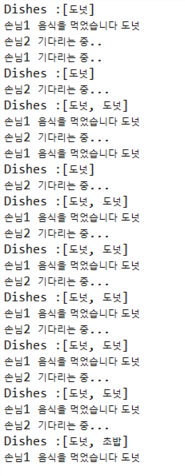
결과값


차근차근 해석해보자.


손님 스레드, 요리사 스레드, 테이블을 구현해줬다.


손님과 요리사는 table 객체를 이용하고 있다.


손님은 eatFood로 table에 있는 요리를 먹어치울 수 있다(remove).


그래서 손님의 작업 run() 메서드에는 if(eayFood()) 음식을 먹었더라면 ~ 음식을 먹었고 , 못먹었으면 슬퍼한다.


요리사의 run() 메서드에는 idx 변수를 이용한 랜덤으로 { 도넛 , 초밥 , 햄버거 , 도넛 } * 난수(0.0~0.9) 로 음식을 만들어

테이블에 만들어준다.


테이블에 놓을 수 있는 음식들은 MAX_FOOD = 6; 6개 까지이다. 이것은 변하지 않아서 상수로 둔다. ( 테이블 크기가 커지진 않으니깐.. )


만약 테이블 보다 크면 다시 돌려보내고 , 아니면 음식을 추가한다.


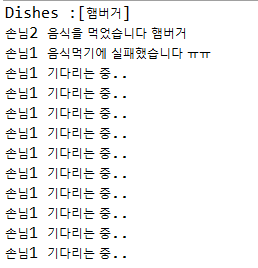
이 코드에서 문제점이 있다.

음식이 없을때 휴식 룸에서 기달리거나 해야되는데 계속 그 자리에서 기다리고 있어서 손님1이 기다리는중 .. 이 계속 뜬


다. 


이걸 해결하려면 음식이 없을때는 손님을 wait()으로 기다리게 해줘야 한다.


요리사가 음식을 추가하면, notify()로 손님한테 알려주면 된다. (notifyAll()은 모든 기다리는 쓰레드를 깨움)


package ThreadPt;

import java.util.ArrayList;


public class ThreadCook {
	public static void main(String[] args) throws Exception{ //예외 발생하니깐 던질거임
		Table table = new Table(); // 여러 쓰레드가 공유하는 객체 테이블
		
		new Thread(new Cook(table), "COOK").start();
		new Thread(new Customer(table,"도넛"), "손님1").start();
		new Thread(new Customer(table,"햄버거"), "손님2").start();
		
		Thread.sleep(5000);
		System.exit(0);
	}
}

class Customer implements Runnable{
	private Table table;
	private String food;
	
	Customer(Table table, String food) {
		this.table = table;  
		this.food  = food;
	}
	
	@Override
	public void run() {
		while(true) {
			try { Thread.sleep(10);} catch(InterruptedException e) {}
			String name = Thread.currentThread().getName();

			if(eatFood())
				System.out.println(name + " 음식을 먹었습니다 " + food);
			else 
				System.out.println(name + " 음식먹기에 실패했습니다 ㅠㅠ ");
		}
		
	}
	boolean eatFood() { return table.remove(food); }
}

class Cook implements Runnable{
	private Table table;

	Cook(Table table) {	this.table = table; }

	public void run() {
		while(true) {
			int idx = (int)(Math.random()*table.dishNum());
			table.add(table.dishNames[idx]);
			try { Thread.sleep(100);} catch(InterruptedException e) {}
		}
	}
}

class Table{
	String[] dishNames = {"도넛","초밥","햄버거","도넛"};
	final int MAX_FOOD = 6;
	private ArrayList<String> dishes = new ArrayList();
	
	// 음식을 추가
	public synchronized void add(String dish) { // synchronzied를 추가했음 (임계 영역)
		if(dishes.size() >= MAX_FOOD) {
			String name = Thread.currentThread().getName();
			System.out.println(name + " 은 기다리는중 .");
			try {
				wait(); //★★★★★★★★★★★★★★★★★★★★★★★★★★★★★
				Thread.sleep(500);
			} catch (InterruptedException e) {}
		}
		dishes.add(dish);
		notify(); //★★★★★★★★★★★★★★★★★★★★★★★★★★★★★
		System.out.println("Dishes :" + dishes.toString());
	}
	
	// 음식을 제거
	public boolean remove(String dishName) {
		synchronized (this) {
			String name = Thread.currentThread().getName();
			while(dishes.size()==0) {
				System.out.println(name+" 기다리는 중..");
				try {
					wait(); //★★★★★★★★★★★★★★★★★★★★★★★★★★★★★
					Thread.sleep(500);
				} catch (InterruptedException e) {}
			}
			
			while (true) {
				for (int i = 0; i < dishes.size(); i++) {
					if (dishName.equals(dishes.get(i))) {
						dishes.remove(i);
						notify(); // ★★★★★★★★★★★★★★★★★★★★★★★★★★★★★
						return true;
					}
				}

				try {
					System.out.println(name+" 기다리는 중...");
					wait(); //★★★★★★★★★★★★★★★★★★★★★★★★★★★★★
					Thread.sleep(500);
				} catch (InterruptedException e) {}
			}
		}
	}
	
	public int dishNum() {return dishNames.length;}
}

★ 모양의 코드로 효율적으로 바꿧다.


69line 이것은 요리사(Cook)이 휴식하라는 wait() 메서드이다 테이블에 요리가 꽉 차있어서 못 놓기 때문.

74line notify()는 요리가 추가 되어서 손님에게 알려주는 코드

85line 여기는 손님이 요리가 없어서 잠시 휴식하러 가라는 wait()코드.

94line 손님이 먹으려는 음식과 같은 음식이 있어서 요리사 보고 갔다 놓으라고 깨워주는 notify()코드이다.

101line 원하는 음식이 없다고 계속 테이블에서 대기하는 손님보고 쉬라고하는 wait()코드이다.


하지만 notify()메서드는 휴식 하고 있는 스레드 중 하나를 깨우기 때문에 요리사를 깨워야 하는데 손님을 깨울수 가 있다.

그래서 종류가 구별되는 lock and condition 이 나왔다. 
- 멀티 쓰레드 프로세스에서는 다른 쓰레드의 작업에 영향을 미칠 수 있다 !

- 진행중인 작업이 다른 쓰레드에게 간섭을 받지 않으려면 '동기화' 필요

- 동기화하려면 간섭받지 않아야 하는 문장들을 '임계 영역'으로 설정

- 임계 영역은 락(lock)을 얻은 단 하나의 쓰레드만 출입가능(객체 1개에 락 1개)


쓰레드의 동기화 ( ? )

한 쓰레드가 진행중인 작업을 다른 쓰레드가 간섭하지 못하게 막는 것이다.


synchronized로 임계영역(lock이 걸리는 영역)을 설정하는 방법 2가지

//1. 메서드 전체를 임계 영역으로 지정
public synchronized void calcSum(){
	// ..
}

//2. 특정한 영역을 임계 영역으로 지정
synchronized(객체의 참조변수){
	// ..
}

은행 예제

package ThreadPt;

public class syn1 {

	public static void main(String[] args) {
		Runnable r = new Runn2();
		new Thread(r).start();
		new Thread(r).start();
	}

}
// 은행
class Account2{
	private int balance = 1000; // private으로 해야 동기화가 의미 있음. public이면 접근할 수 있음 ..
	
	public int getBalance() {
		return balance;
	}
	
	// 출금 하는 동안 출금을 실행시킬수 없으니깐 synchronized로 메서드 동기화 시켰음
	public synchronized void withdraw(int money) {
		if(balance >= money) {
			try {Thread.sleep(1000);} 
			catch (InterruptedException e) {}
			balance -= money;
		}
	}
	
}

class Runn2 implements Runnable{
	Account2 ac2 = new Account2();
	
	@Override
	public void run() {
		while(ac2.getBalance() > 0) {
			int money = (int)(Math.random()*3 +1) * 100;
			ac2.withdraw(money);
			System.out.println("잔고 : " + ac2.getBalance());
		}
	}
}

은행을 만들어서 처음에 은행 잔고에는 1000이 있고


출금을 하는데 랜덤으로 100 , 200 , 300중의 한 값을 임의로 선택해서 출금하는 예제이다.


잔고가 점점 줄어들다가 스레드(일꾼이)이 두명이 와서 출금하는데 


잔고가 200원이 남았을때 if(balance >= money)문을 A,B둘다 통과해서


A가 200원을 빼가고 , B도 200원을 빼가면 마이너스가 될 수 있다. ( synchronized  키워드가 없을 때 ! )


지금은 임계영역이 걸려있으므로 (lock) 객체 1개만 들어올 수 있다. ( 출금은 한명만 가능 ! 끝나고 withdraw메서드 사용 가능 )


한 번의 한개의 스레드만 들어올 수 있다.


join()

- 지정된 시간동안 특정 쓰레드가 작업하는 것을 기다림.


만약 A작업하고 B작업을 하는데 두 작업이 마쳐야지 진행이 가능할 때


void join() // 작업이 모두 끝날때 까지

void join(long millis) // 천분의 일초 동안


- 마찬가지로 예외처리를 해야 함. (interrupted이 발생하면 작업 재개)


코드로 살펴보자

package ThreadPt;

public class ThreadJY {
	static long startTime = 0;
	
	public static void main(String[] args) {
		Thread_1 th1 = new Thread_1();
		Thread_2 th2 = new Thread_2();
		th1.start();
		th2.start();
		startTime = System.currentTimeMillis();
		
		try {
			th1.join(); // main쓰레드가 th1의 작업이 끝날때 까지 기다림.
			th2.join(); // main쓰레드가 th2의 작업이 끝날때 까지 기다림.
		} catch (InterruptedException e) {}
		
		System.out.println("소요시간 : " + (System.currentTimeMillis() - startTime));
	}

}
class Thread_1 extends Thread{
	@Override
	public void run() {
		for(int i=0; i < 300; i++) {
			System.out.print(new String("☆"));
		}
		
	}
}
class Thread_2 extends Thread{
	@Override
	public void run() {
		for(int i=0; i < 300; i++) {
			System.out.print(new String("★"));
		}		
	}
}

스레드1은 ☆ , 스레드2는 ★ 를 찍어주는 것을 확인할 수 있다.


만약 th1.join() , th2.join() 메서드가 있기 때문에 메인쓰레드는 둘의 스레드를 기다려준다.

System.out.println 소요시간 부분이 마지막에 찍힌 것을 확인

th1.join() , th2.join() 이 없다면 ? 

기다려주지 않으면 그냥 메인쓰레드가 자기할일 하고 종료


yield()

- 남은 시간을 다음 스레드에게 양보하고, 자신(현재 쓰레드)은 실행대기한다.


5초라는 시간을 받았는데 2초만에 작업을 완료했으면 3초 포기하고 다시 돌아감. ( static이므로 자기 자신한테만 가능 )


- yield()와 interrupt()를 적절히 사용하면, 응답성과 효율을 높일 수 있다.

( yield도 역시 OS스케쥴러한테 통보만 하지 원하는대로 안될수도 있음 ) 

	@Override
	public void run() {
		while(!stopped) { // 멈추면 반복문 끝
			if(!suspended) { // 정지되지 않았으면 ?
				System.out.println(Thread.currentThread().getName());
				try {
					Thread.sleep(1000);
				} catch (InterruptedException e) {}
			}else {
				Thread.yield();
			}
		}
	}

suspended가 false면 일시정지 상태여서 작업을 못하는데 계속 while문에서 할 일 없이 반복하고 있음.


이것을 busy-waiting 그냥 할 일 없이 반복문만 돌고 있는거임.. 그래서 else{} 주어진 시간을 양보하는 것.

suspend(), resume(), stop()

suspend() : 스레드를 일시정지시킨다.

resume() : suspend()에 의해 일시 정지된 스레드를 실행대기상태로 만든다.

stop() : 쓰레드를 즉시 종료시킨다.


이 메서드들은 deprecated 되었음

deprecated? 사용을 권장하지 않는다. why? 교착상태를 일으키기 쉽기 때문..

package ThreadPt;

public class ThreadDepre {

	public static void main(String[] args) {
		RunImpl r = new RunImpl();
		Thread th1 = new Thread(r, "1");
		Thread th2 = new Thread(r, "22");
		Thread th3 = new Thread(r, "333");
		th1.start();
		th2.start();
		th3.start();
		
		try {
			Thread.sleep(2000);
			th1.suspend(); // 쓰레드 th1 잠시 중단
			Thread.sleep(2 * 1000);
			th2.suspend();
			Thread.sleep(3000);
			th1.resume(); // 쓰레드 th1이 다시 동작하도록
			Thread.sleep(4000);
			th1.stop(); // 쓰레드 th1 강제종료
			th2.stop();
			Thread.sleep(4000);
			th3.stop();
		} catch (InterruptedException e) {
			// TODO: handle exception
		}
	}

}

class RunImpl implements Runnable{
	@Override
	public void run() {
		while(true) {
			System.out.println(Thread.currentThread().getName()); //쓰레드 이름 출력
			try {
				Thread.sleep(1000);
			} catch (InterruptedException e) {}
		}
		
	}
}

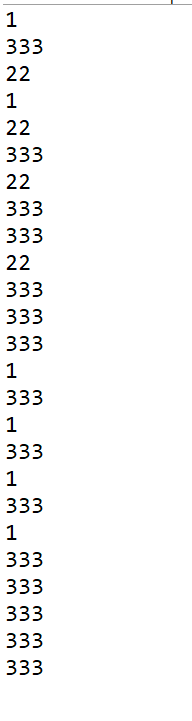
결과

스레드를 Runnable를 구현해서 세 개를 만들어준다.

new Thread(r, "1");은 Thread 메서드 만들때 이렇게 사용 가능

th1, th2, th3를 시작해주고 th1.suspend()를 하면 잠시 중단돼서 안 나오는 것을 볼 수 있음


그리고 다시 resume() 메서드로 재개해주면 다시 동작하는 것을 볼 수 있고,


마지막으로 stop() 메서드를 이용해서 강제로 종료된 것을 확인할 수 있는 코드이다.


deprecated된 메서드이므로, th1.suspend(); << 로 보인다.


스레드를 직접구현
package ThreadPt;

public class ThreadDepre {

	public static void main(String[] args) {
		MyThread th1 = new MyThread("1");
		MyThread th2 = new MyThread("22");
		MyThread th3 = new MyThread("333");
		th1.start();
		th2.start();
		th3.start();
		
		try {
			Thread.sleep(2000);
			th1.suspend(); // 쓰레드 th1 잠시 중단
			Thread.sleep(2 * 1000);
			th2.suspend();
			Thread.sleep(3000);
			th1.resume(); // 쓰레드 th1이 다시 동작하도록
			Thread.sleep(4000);
			th1.stop(); // 쓰레드 th1 강제종료
			th2.stop();
			Thread.sleep(4000);
			th3.stop();
		} catch (InterruptedException e) {}
	}

}

class MyThread implements Runnable{
	boolean suspended = false;
	boolean stopped = false;
	
	Thread th;
	
	MyThread(String name){
		th = new Thread(this, name); // Thread(Runnable r, String name);
	}
	
	void start() {
		th.start();
	}
	
	void stop() {
		stopped = true;
	}
	
	void suspend() {
		suspended = true;
	}
	
	void resume() {
		suspended = false;
	}
	@Override
	public void run() {
		while(!stopped) { // 멈추면 반복문 끝
			if(!suspended) { // 정지되지 않았으면 ?
				System.out.println(Thread.currentThread().getName());
				try {
					Thread.sleep(1000);
				} catch (InterruptedException e) {}
			}
		}
	}
}

직접 이렇게 메서드를 만들어서 run() 작업 내용을 작성하는 방법이 있다.

31~32line 에서 앞에 volatile boolean ~. < 쉽게 바뀌는 변수이다 라고 볼 수 있다.

sleep() 😴

쓰레드의 실행 제어는 sleep 하고 yield가 있다.


- 현재 쓰레드를 지정된 시간동안 멈추게 함

- static이 붙어 있는 메소드로 자기 자신만 제어 가능

- 예외처리를 해야 한다.(interruptedException이 발생하면 깨어남)

try{
	Thread.sleep(1, 500000); // 뒤에 500000은 나노초
} catch (InterruptedException e) {}

sleep 상태가 된 쓰레드는 누가 깨우거나, 시간이 다 되어야지 일어난다.


자고 있는 동안 누가 깨우면 예외가 발생 ! 그것을 잡기 위한 것이 InterruptedException <- 예외처리 필수 !

더보기

예외처리 필수인 이유

sleep 메서드에 가보면 throw InterruptedException을 예외를 발생하게 만들었음

그리고 InterruptedException을 가보면 Exception의 자손인 것을 알 수 잇고, Exception은 필수예외처리 이기 때문.


대부분, sleep을 매번 예외처리 해줘야 하기 때문에

void delay(long mills){
	try{
    	Thread.sleep(mills);
    } catch(InterruptedException e) {}
}

이와 같이 delay 메서드를 만들고

delay(15); 로 간편하게 이용할 수 있다.


코드로 살펴보자

package ThreadPt;

public class ThreadSleep {

	public static void main(String[] args) {
		Threada1 th1 = new Threada1();
		Threada2 th2 = new Threada2();
		
		th1.start();
		th2.start();
		
		try {
			Thread.sleep(2000);
		} catch (InterruptedException e) {}
		
		System.out.print("●메인 종료●");
	}

}
class Threada1 extends Thread{

	@Override
	public void run() {
		for(int i=0; i<100; i++) {
			System.out.print("a1");
		}
		System.out.print("●th1 종료●");
	}
	
}
class Threada2 extends Thread{

	@Override
	public void run() {
		for(int i=0; i<100; i++) {
			System.out.print("a2");
		}
		System.out.print("●th2 종료●");
	}
	
}

실행 결과를 보면 메인 종료가 마지막에 찍힌다.


그 이유는 메인 쓰레드에서 쓰레드를 2초동안 잠자게 했기 때문 !


메인 쓰레드에 있는 Thread.sleep(2000); - > th1.sleep(2000); 으로 바꾸면 어떻게 될까?


th1이 잠자서 늦게 끝날 것 같지만 .. 결과적으로 메인 종료가 똑같이 마지막에 찍힌다.


그 이유는? sleep은 자기 자신만 제어가 가능
Thread이름을 th1으로 바꿔도 에러가 안나고 실행되기 때문 결국 메인 쓰레드가 잠자는 것이다 !


위에 코드를 살짝 바꿔보자면..

package ThreadPt;

public class ThreadSleep {

	public static void main(String[] args) {
		Threada1 th1 = new Threada1();
		Threada2 th2 = new Threada2();
		
		th1.start();
		th2.start();
		
		delay(2000); //또는 2 * 1000
		System.out.print("●메인 종료●");
	}
	
	static void delay(long millis) {
		try {
			Thread.sleep(millis);
		} catch (InterruptedException e) {}
	}

}
class Threada1 extends Thread{

	@Override
	public void run() {
		for(int i=0; i<100; i++) {
			System.out.print("a1");
		}
		System.out.print("●th1 종료●");
	}
	
}
class Threada2 extends Thread{

	@Override
	public void run() {
		for(int i=0; i<100; i++) {
			System.out.print("a2");
		}
		System.out.print("●th2 종료●");
	}
	
}

delay() 메서드를 이용해서 좀 더 깔끔해지는 것을 확인할 수 있다.


interrupt()

- 대기상태(WAITING)인 쓰레드를 실행대기 상태(RUNNABLE)로 만든다.


sleep() or wait() , join() 에 의해서 잠자거나 중단되는데 그것을 깨우는 역할을 한다!


void interrupt() : 쓰레드의 interrupted 상태를 false -> true 로 변경

boolean isInterrupted() : interrupted상태를 반환.

static boolean interrupted() 현재 쓰레드의 interrupted상태를 알려주고, false로 초기화


쉽게 interrupt를 호출하면 원래 false로 되어있는데 true를 반환해 줌.

isInterrupted는 원래 상태를 알려줌 false.


package ThreadPt;

import javax.swing.JOptionPane;

public class ThreadInterrup {

	public static void main(String[] args) {
		Threadb1 b1 = new Threadb1();
		b1.start();
		System.out.println("isInterrupted() : " + b1.isInterrupted()); // false 상태

		String input = JOptionPane.showInputDialog("종료하시겠습니까?");
		b1.interrupt();
		System.out.println("isInterrupted() : " + b1.isInterrupted()); // true 상태
	}

}
class Threadb1 extends Thread{

	@Override
	public void run() {
		int i = 10;
		
		//i는 0이 아니고, 중단이 안되었으면 돌아가는 반복문
		while(i!=0 && !isInterrupted()) {
			System.out.println(i--);
			for(long x=0;x<2500000000L;x++);
		}
		System.out.println("종료되었습니다.");
	}
	
}

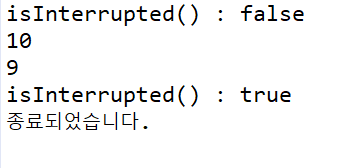
코드를 실행시키면 대화상자가 나오는데 아무값이나 입력하고 확인을 하면

종료되면서 Interrupted 상태가 true로 된것을 확인할 수 있다.


27line : for(long x=0;x<2500000000L;x++); 코드의 의미는 시간을 지연시키기 위함 반복문을 도는데 시간이 걸리기 때문


가장 중요한것! interrupted는 static 메서드이다 !

+ Recent posts